Category: Hardware

Devices

  • Smart Thermostat

    Smart Thermostat


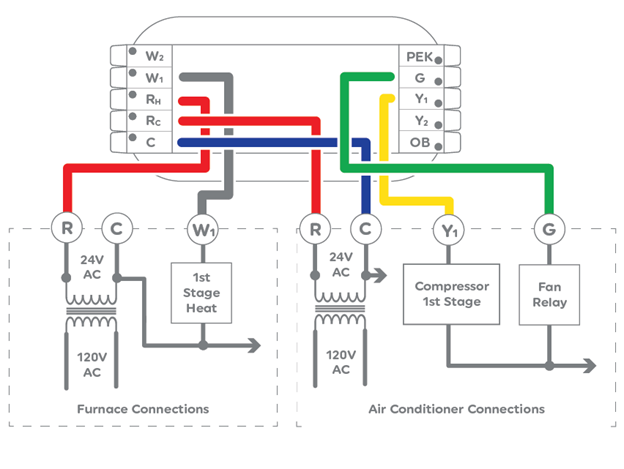
    This is just a conversion from a two wire thermostat to a smart thermostat with no other wires available like the C- Common wire.

    Solution? Install an external 24vac transformer and connect one wire to Common connection. The other wire depends on the configuration:

    For furnace heating only – power to RC and C

    For AC only – power to RH and W1

    This is only to power up the smart thermostat when there’s just two wire available to use from the old thermostat. And this will make the wi-fi running on the device for you to control.

    But you have to remember that this is only for just two wire connections. And you cannot control the fan as they are probably hard wired at the furnace/AC unit. Not both.

    So, if you need full control, install and layout the 5 or 6 wire cable.

    Good luck!

  • WordPress website crashed after ADM5.0 updates on Asustor NAS!

    WordPress website crashed after ADM5.0 updates on Asustor NAS!


    Welcome to WordPress world using Asustor NAS. Totally fine but non accessible after updating to ADM 5.0. So, beware! I am still troubleshooting but what a bummer!

    Recent Updates: (So far, it is stable)

    • Remove old PHP version 7.3/7.4
    • Applied new updates for ADM 5.0 compatible MariaDb
    • NAS Asustor was updated automatically to ADM 5.0.1.RKD2
    • Scheduled Power Restart on Sunday @1:01 AM to refresh system
  • Simple Few Tips on Google Pixel 10

    Simple Few Tips on Google Pixel 10


    It’s quite a hassle to navigate a Google Pixel 10 phone, here’s some quick tips I found:

    • Accessing the WIFI connection
      • Just tap and hold for a second on the upper right hand corner
      • The menu will come up to change the Wi-fi settings
      • You can also see the flash light control (On/Off)
    • To access the (at a glance) apps settings, hold your two fingers together and slide from the upper middle top (main page). The settings menu will show up.
    • To remove the open applications, slide from the bottom up (similar to iPhone) to show all the opened applications. You can remove each one by the same way.
    • To install a new applications, just enter the (app name) install and search from the google bar.